How It Works
Two ways to start, one standing seam report workflow.
Upload a File or Sketch the Roof
Upload Hover ESX/XML or EagleView XML/JSON for the fastest path, or sketch the roof from a scale drawing or reference image when you do not have a measurement file.
Confirm Report Settings
Set panel coverage, seam height, trim options, waste, company details, and material order settings before the report is generated.
Generate, Review, and Export
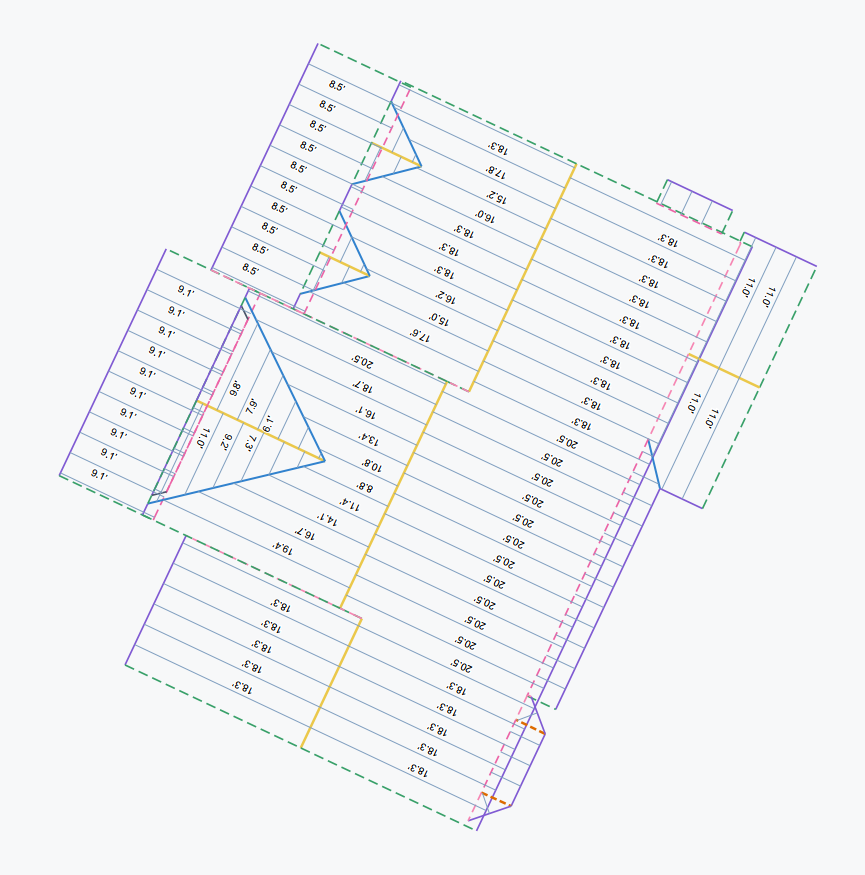
Generate the Instant Report in seconds from supported files or in minutes from a sketch, then review facets, recalculate settings for free, and download the PDF.
Sample Report Library
See the actual output before creating an account: a standing seam report from a supported roof file, the sketch workflow that can feed the same report engine, the Material Order form, and the Ice And Water Shield calculator PDF.
Material Order form preview. Generated copy and CSV exports stay inside the app after a report is created.
Built From The Trade
Built for Standing Seam Material Quantities
Panel Takeoff was built by a former insurance adjuster turned roofer to solve the material quantity problem in standing seam estimates, supplements, and ordering.
The product is intentionally narrow: take roof geometry from supported files or a scaled sketch, then produce panel-level quantities, trim totals, material order information, and a report that can be used by the office, supplier, crew, client, or adjuster.
Simple Pricing for Instant Reports
One credit generates one standing seam Instant Report. Credits never expire.
Upload a supported measurement file for a report in seconds, or sketch the roof for a report in minutes.
- ✓Hover ESX/XML and EagleView XML/JSON import
- ✓Sketch-to-Instant-Report path for jobs without a file
- ✓Roof sketch, facet review, and panel cut list
- ✓Panel lengths, panel counts, and coil footage
- ✓Trim quantities for standing seam edge types
- ✓Complete material order and PDF export
- ✓Recalculate report settings at no extra cost
- ✓No subscription required
Frequently Asked Questions
Everything you need to know before getting started.